Blog · Websites & Lead Systems
Why Small Businesses Need a CRM Now: Every Month Without a Lead System Costs You Customers
WebScaling Team · October 06, 2026 · 11 min read

Quick answer: Small businesses need a CRM because it captures every customer's details, conversations and jobs in one list you own, then lets automation handle follow-ups, review requests and reminders. The real reason to start now is that the benefits compound: every month adds customers you can contact again, reviews that strengthen your Google profile and hours saved. Every month you wait, that value is lost.
Most owners of small service businesses plan to "get a proper system at some point". Meanwhile, customer details sit in a phone, on paper job sheets and in old text threads, and nobody asks for the review or sends the reminder. This guide explains what builds up month by month, what waiting costs you, how to own your customer data properly and what to set up first.
What a CRM means for a local service business
CRM stands for customer relationship management. For a plumber, electrician, cleaner, clinic or salon, it isn't a complicated sales tool. It's simply one place where every customer lives:
Name, phone, email and address
Every call, text, email, chat and form they've sent you
Which jobs you did, when, and what's still open (quotes, follow-ups, bookings)
Whether they've agreed to hear from you again
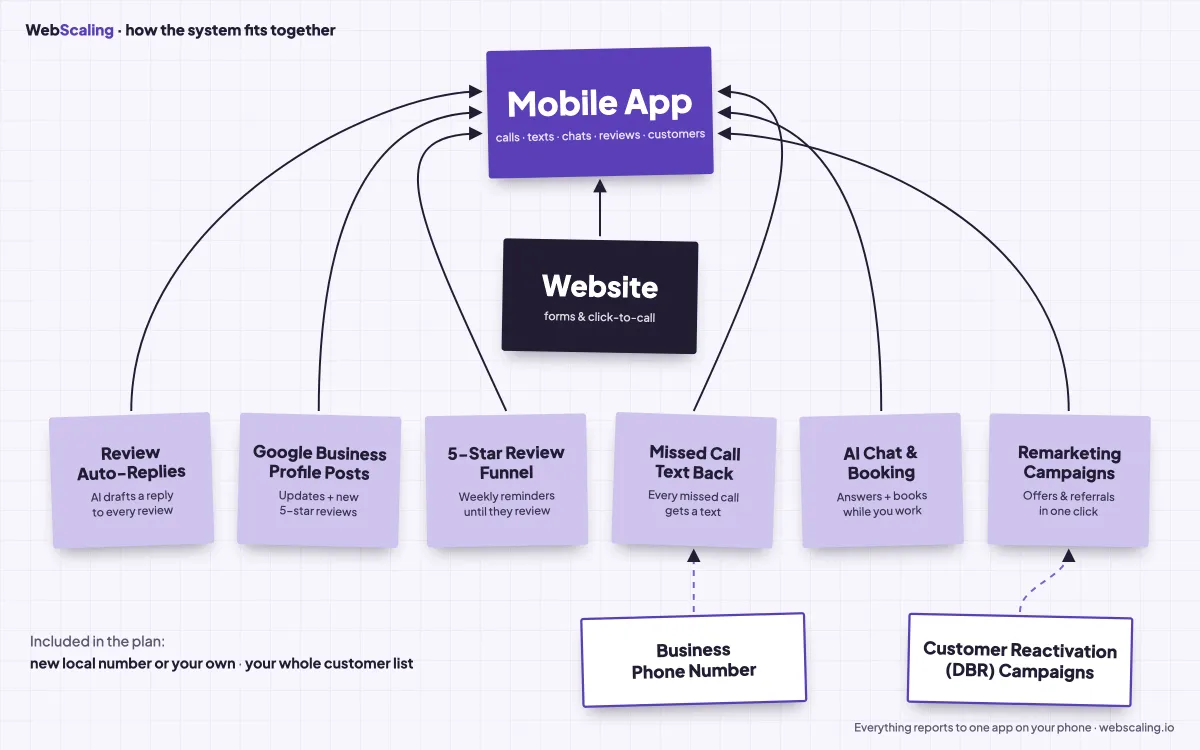
On its own, a CRM is a tidy address book. It becomes a lead system when it's connected to your website, phone number and Google Business Profile, with automations that act on the data: a text back when you miss a call, a review request after the job, a reminder before the appointment, a follow-up when a quote goes quiet. (For the full picture, see what a lead generation website is.)
Why starting now matters: five things that compound
Most tools give you the same value in month 12 as in month 1. A lead system keeps building on what came before.
1. A customer list you own, growing from day one
Every customer who calls, books or messages you is saved automatically, with their history. After a year you have an organised list of everyone you've worked for, what you did and when. That list is an asset that doesn't depend on an ad platform, a directory or a lead marketplace.
The catch: it only contains customers from the day you start. Nobody goes back and types in two years of old job sheets.
2. A Google Business Profile that gets stronger every month
Google says local results are mainly based on relevance, distance and prominence, and that prominence takes into account information such as how many reviews you have. In Google's own words, "More reviews and positive ratings can help your business's local ranking" (Google Business Profile Help). Google also recommends replying to reviews, because it shows customers you value their feedback.
When every customer is asked for a review after the job, and every review gets a reply, your profile grows steadily instead of in random bursts. Reviews don't expire when you stop paying for anything, so each one keeps working for you. More on this in how to get more Google reviews and how to rank higher on Google Maps.
One rule matters here: ask every customer the same way, and never offer a discount or reward for a review. Google's review policy prohibits incentives and selectively asking only happy customers.
3. Past customers you can reach again
Your easiest next job is often someone you've already worked for. With a CRM, you can send past customers (who have agreed to hear from you) useful, well-timed messages by text or email:
Seasonal reminders: "It's been a year since your boiler service, want us to book the next one?"
Repeat-job offers: "We're doing gutter cleans in your area next week."
Referral asks: "If a neighbour needs an electrician, we'd be grateful for the recommendation."
The bigger your list, the more each campaign is worth.
4. Free leads that build up instead of paid leads that stop
With paid ads and lead marketplaces, you pay for every click or lead, and the flow stops when you stop paying. A website with clear service pages and a Google profile with growing reviews builds visibility gradually. That takes time, which is exactly why starting earlier helps: the reviews and content you build now become the free enquiries you get later.
5. Automation that gives you hours back
The repetitive jobs that eat your evenings can run on their own:
Missed call text back: a caller you couldn't answer gets an instant text, so they don't ring the next business.
Review requests: sent after each job, with one polite reminder.
Follow-ups: quotes that haven't been answered get a nudge.
Appointment reminders: fewer no-shows and "sorry, I forgot".
Fast replies matter because people often contact several businesses; see speed to lead.
Month 1 to month 12: what builds up (an illustration)
Important: the numbers below are a made-up example to show how things add up. They are not a forecast, a benchmark or a client result. Swap in your own numbers.
Example: a business doing 30 jobs a month. Assume, for the example only, that 5 customers a month leave a Google review when asked.
Point in time | Customers saved in your CRM | Review requests sent | New reviews (example: 5 a month) |
|---|---|---|---|
Month 1 | 30 | 30 | 5 |
Month 3 | 90 | 90 | 15 |
Month 6 | 180 | 180 | 30 |
Month 12 | 360 | 360 | 60 |
What that looks like in practice:
Month 1: The system is live. Missed calls get a text back, every enquiry lands in one inbox, and the first customers are asked for reviews. The list is small, but nothing is being lost any more.
Month 3: You have a few months of customers, and your Google profile shows a steady flow of recent reviews with replies. Follow-ups on quotes are happening without you remembering them.
Month 6: The list is big enough for a first proper past-customer campaign, such as a seasonal reminder to everyone who had a service six months ago and agreed to hear from you.
Month 12: A full year of customers you can reach and a year of reviews working for your profile. Annual reminders start to make sense because the first customers are due again.
Now the time side. Suppose you'd send each customer a review request, a reminder and an appointment reminder by hand, at about 2 minutes per message (again, an assumption). That's 90 messages, around 3 hours a month or 36 hours a year, before missed-call replies and quote follow-ups. In practice, most owners simply don't do it, which is the bigger loss.
The cost of waiting: what you lose every month
Waiting feels free. But every month without a system, in the same example, you lose:
30 customers' details that stay scattered in a phone, an inbox or a notebook instead of a list you can use.
30 review requests that never go out, and the reviews that would have strengthened your profile.
Reviews without replies, which tell future customers nobody is listening.
Missed calls that end at voicemail, and callers who try the next business instead.
Quotes that go cold because nobody followed up.
Past customers never contacted again, who may book a competitor for their next job simply because they couldn't remember your name.
Evenings spent on admin that software could have done.
Starting in six months means those six months of customers are gone for good.
"Do I really need a CRM yet?"
"I'm too small." Small businesses often benefit most, because there's no office team to send reminders and chase quotes. Starting small also means clean data from the beginning.
"I use my phone contacts and a spreadsheet." Neither records what job you did, sends texts or notices a missed call. You've outgrown them if you can't quickly answer "who did we work for last spring?", enquiries arrive in several apps, and follow-ups depend on your memory.
"I'm too busy to set it up." That's a reason to start, not to wait. If someone sets it up for you, the time you need to spend is small.
Owning your customer data (and using it properly)
A customer list is only an asset if you can actually use it. A few basics keep it professional. This is general information, not legal advice; check the rules for your country.
Get permission for marketing. In the UK, the ICO's guidance on electronic mail marketing says marketing emails and texts to individuals need specific consent, or the "soft opt-in" for existing customers who bought a similar service, as long as you gave them a clear way to opt out when you collected their details and in every message. In the US, the FCC says commercial texts require written consent. A simple tick box on your booking form ("Send me reminders and offers") covers the practical side.
Make opting out easy. Every marketing message should include a way to stop, such as "Reply STOP to opt out", and opt-outs should be respected straight away.
Keep service and marketing messages separate. An appointment reminder is not the same as an offer. Only send offers to people who agreed to them.
Keep only what you need. Contact details, job history and consent status are enough. Never buy contact lists.
Handle deletion requests. Under UK GDPR, people can ask you to erase their data (verbally or in writing), and you generally have one month to respond. A CRM makes this easy, because the customer is in one place instead of five.
Know how to export your data. Whichever system you use, check how you would export your contacts. It's your list.
What to set up first: a 30-day plan
Week 1: Capture everything. Connect your website forms, business phone number and Google profile messages to one inbox and CRM. Add a marketing consent tick box to your forms.
Week 2: Stop the leaks. Switch on missed call text back and an instant reply to every website enquiry.
Week 3: Start the reviews. Send an automatic review request after every completed job, plus one reminder, and reply to every review.
Week 4: Save time. Add appointment reminders and a simple follow-up for quotes that haven't been answered. Then put a date in your calendar, around month 3 to 6, for your first past-customer campaign.
For more ideas on getting found and winning jobs, see our guide to home service marketing.
How WebScaling can help
WebScaling is a web agency for small businesses in Morocco and around the world. We start with your website and the 5-service pack: a website that turns visitors into calls and messages, your Google Business Profile and reviews, SEO, visibility in AI answers (GEO) and a client dashboard. When your business is ready, we add premium services such as Google & Meta Ads, AI agents, automations and dashboards.
Book a free call: you get a clear plan and a fixed quote, with no hidden fees.
FAQ
Why do small businesses need a CRM?
Because it keeps every customer, conversation and job in one place, so leads aren't lost and past customers can be contacted again. Connected to automation, it also handles follow-ups, review requests and reminders that small teams rarely have time to do by hand.
Is a CRM worth it for a small business?
For most service businesses, yes, if it's actually used. The value comes from what it prevents (lost leads, forgotten follow-ups) and what it builds over time (a customer list, reviews and repeat work). The longer it runs, the more it's worth.
Can I use a spreadsheet instead of a CRM?
A spreadsheet can store names, but it can't log calls and texts automatically, send review requests or remind you about quotes. Once enquiries come from several channels, a spreadsheet usually falls behind.
When should a small business start using a CRM?
As early as possible. The CRM only contains customers from the day you start, and reviews and past-customer lists take months to build. Starting early also means clean data from day one instead of a messy migration later.
Can I send offers to past customers by text?
Yes, if they've agreed to receive marketing (or, in the UK, the soft opt-in for existing customers applies) and every message includes an easy way to opt out. In the US, commercial texts require written consent. Keep offers separate from review requests.
How long does it take to set up?
With WebScaling, building your website and lead system takes 7 to 10 days once we have your onboarding details, and it starts capturing customers as soon as it's live.

WebScaling is a web agency for small businesses in Morocco and around the world: websites, Google Business Profile and reviews, SEO and AI visibility, then ads, AI agents, automations and custom software.